一、找图片的网站
https://www.pexels.com/search/website/
二、滑动效果的图片
1.成果展示
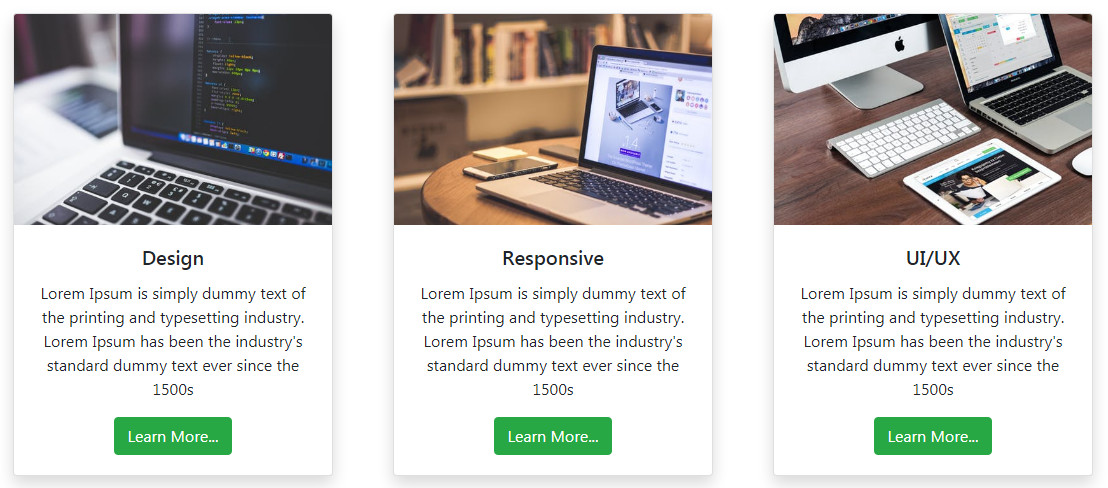
2.代码
<!DOCTYPE html>
<html lang="en">
<head>
    <meta charset="UTF-8">
    <meta name="viewport" content="width=device-width, initial-scale=1.0">
    <meta http-equiv="X-UA-Compatible" content="ie=edge">
    <title>Card Image Hover</title>

    <link rel="stylesheet" href="https://stackpath.bootstrapcdn.com/bootstrap/4.1.2/css/bootstrap.min.css" integrity="sha384-Smlep5jCw/wG7hdkwQ/Z5nLIefveQRIY9nfy6xoR1uRYBtpZgI6339F5dgvm/e9B" crossorigin="anonymous">
    <link rel="stylesheet" href="Style.css">

</head>
<body>


    <div class="container">
        <div class="row justify-content-center">
            <div class="col-md-4">
                <div class="card shadow" style="width: 20rem;">
                    <div class="inner">
                        <img class="card-img-top" src="Stock/pexels-4.jpeg" alt="Card image cap">
                    </div>
                    <div class="card-body text-center">
                      <h5 class="card-title">Design</h5>
                      <p class="card-text">
                        Lorem Ipsum is simply dummy text of the printing and typesetting industry.
                        Lorem Ipsum has been the industry's standard dummy text ever since the 1500s
                      </p>
                      <a href="#" class="btn btn-success">Learn More...</a>
                    </div>
                  </div>
            </div>
            <div class="col-md-4">
                <div class="card shadow" style="width: 20rem;">
                    <div class="inner">
                            <img class="card-img-top" src="Stock/pexels-5.jpeg" alt="Card image cap">
                    </div>

                    <div class="card-body text-center">
                      <h5 class="card-title">Responsive</h5>
                      <p class="card-text">
                        Lorem Ipsum is simply dummy text of the printing and typesetting industry.
                        Lorem Ipsum has been the industry's standard dummy text ever since the 1500s
                      </p>
                      <a href="#" class="btn btn-success">Learn More...</a>
                    </div>
                  </div>
            </div>
            <div class="col-md-4">
                <div class="card shadow" style="width: 20rem;">
                    <div class="inner">
                            <img class="card-img-top" src="Stock/pexels-3.jpeg" alt="Card image cap">
                    </div>

                    <div class="card-body text-center">
                      <h5 class="card-title">UI/UX</h5>
                      <p class="card-text">
                        Lorem Ipsum is simply dummy text of the printing and typesetting industry.
                        Lorem Ipsum has been the industry's standard dummy text ever since the 1500s
                      </p>
                      <a href="#" class="btn btn-success">Learn More...</a>
                    </div>
                  </div>
            </div>
        </div>
    </div>

</body>
</html>
css代码
.container{
    margin-top: 8%;
}

.inner{
    overflow: hidden;
}

.inner img{
    transition: all 1.5s ease;
}

.inner:hover img{
    transform: scale(1.5);
}
http://www.dailywebtuition.com/bootstrap-card-image-hover-effect/
参考:https://www.youtube.com/watch?v=k8ioDxSEjZU