看完这个才发现,不是Vue难学,而是没有找到好的教程。
进度:目前已经学到第12节。
一、感想
其实感觉写Vue和写类差不多,主要是写属性、写方法。
基于 Vue.js 的移动端组件库
http://mint-ui.github.io/#!/zh-cn
二、音乐播放器
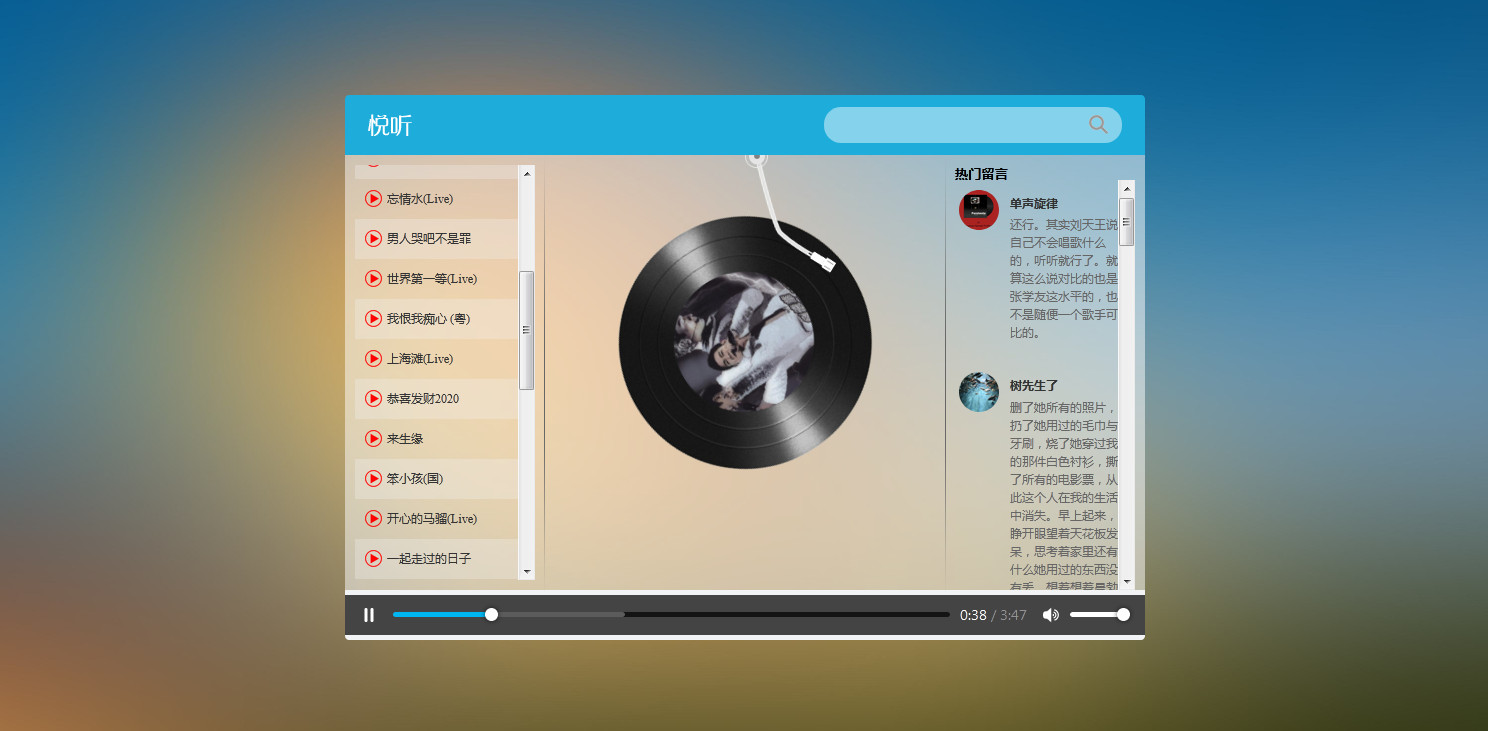
源码:
<!DOCTYPE html>
<html lang="en">

<head>
  <meta charset="UTF-8" />
  <meta name="viewport" content="width=device-width, initial-scale=1.0" />
  <meta http-equiv="X-UA-Compatible" content="ie=edge" />
  <title>Document</title>
  <!-- 样式 -->
  <link rel="stylesheet" href="./css/index.css">
</head>

<body>
  <div class="wrap">
    <div class="play_wrap" id="player">
      <div class="search_bar">
        <img src="images/player_title.png" alt="" />
        <!-- 搜索歌曲 -->
        <input type="text" autocomplete="off" v-model='query' @keyup.enter="searchMusic();" />
      </div>
      <div class="center_con">
        <!-- 搜索歌曲列表 -->
        <div class='song_wrapper' ref='song_wrapper'>
          <ul class="song_list">
            <li v-for="item in musicList">
              <!-- 点击放歌 -->
              <a href="javascript:;" @click='playMusic(item.id)'></a>
              <b>{{item.name}}</b>
              <span>
                <i @click="playMv(item.mvid)" v-if="item.mvid!=0"></i>
              </span>
            </li>

          </ul>
          <img src="images/line.png" class="switch_btn" alt="">
        </div>
        <!-- 歌曲信息容器 -->
        <div class="player_con" :class="{playing:isPlay}">
          <img src="images/player_bar.png" class="play_bar" />
          <!-- 黑胶碟片 -->
          <img src="images/disc.png" class="disc autoRotate" />
          <img :src="coverUrl==''?'./images/cover.png':coverUrl" class="cover autoRotate" />
        </div>
        <!-- 评论容器 -->
        <div class="comment_wrapper" ref='comment_wrapper'>
          <h5 class='title'>热门留言</h5>
          <div class='comment_list'>

            <dl v-for="item in hotComments">
              <dt>
                <img :src="item.user.avatarUrl" alt="" />
              </dt>
              <dd class="name">{{item.user.nickname}}</dd>
              <dd class="detail">
                {{item.content}}
              </dd>
            </dl>
          </div>
          <img src="images/line.png" class="right_line">
        </div>
      </div>
      <div class="audio_con">
        <audio ref='audio' @play="play" @pause="pause" :src="musicUrl" controls autoplay loop class="myaudio"></audio>
      </div>
      <div class="video_con" v-show="showVideo">
        <video ref='video' :src="mvUrl" controls="controls"></video>
        <div class="mask" @click="closeMv"></div>
      </div>
    </div>
  </div>
  <!-- 开发环境版本,包含了有帮助的命令行警告 -->
  <script src="https://cdn.jsdelivr.net/npm/vue/dist/vue.js"></script>
  <!-- 官网提供的 axios 在线地址 -->
  <script src="https://unpkg.com/axios/dist/axios.min.js"></script>
  <script type="text/javascript">
    // 设置axios的基地址
    axios.defaults.baseURL = 'https://autumnfish.cn';
    // axios.defaults.baseURL = 'http://localhost:3000';


    // 实例化vue
    var app = new Vue({
      el: "#player",
      data: {
        // 搜索关键字
        query: '',
        // 歌曲列表
        musicList: [],
        // 歌曲url
        musicUrl: '',
        // 是否正在播放
        isPlay: false,
        // 歌曲热门评论
        hotComments: [],
        // 歌曲封面地址
        coverUrl: '',
        // 显示视频播放
        showVideo: false,
        // mv地址
        mvUrl: ''
      },
      // 方法
      methods: {
        // 搜索歌曲
        searchMusic() {
          if (this.query == 0) {
            return
          }
          axios.get('/search?keywords=' + this.query).then(response => {
            // 保存内容
            this.musicList = response.data.result.songs;

          })

          // 清空搜索
          this.query = ''
        },
        // 播放歌曲
        playMusic(musicId) {
          // 获取歌曲url
          axios.get('/song/url?id=' + musicId).then(response => {
            // 保存歌曲url地址
            this.musicUrl = response.data.data[0].url
          })
          // 获取歌曲热门评论
          axios.get('/comment/hot?type=0&id=' + musicId).then(response => {
            // console.log(response)
            // 保存热门评论
            this.hotComments = response.data.hotComments

          })
          // 获取歌曲封面
          axios.get('/song/detail?ids=' + musicId).then(response => {
            // console.log(response)
            // 设置封面
            this.coverUrl = response.data.songs[0].al.picUrl
          })

        },
        // audio的play事件
        play() {
          this.isPlay = true
          // 清空mv的信息
          this.mvUrl = ''
        },
        // audio的pause事件
        pause() {
          this.isPlay = false
        },
        // 播放mv
        playMv(vid) {
          if (vid) {
            this.showVideo = true;
            // 获取mv信息
            axios.get('/mv/url?id=' + vid).then(response => {
              // console.log(response)
              // 暂停歌曲播放
              this.$refs.audio.pause()
              // 获取mv地址
              this.mvUrl = response.data.data.url
            })
          }
        },
        // 关闭mv界面
        closeMv() {
          this.showVideo = false
          this.$refs.video.pause()
        },
        // 搜索历史记录中的歌曲
        historySearch(history) {
          this.query = history
          this.searchMusic()
          this.showHistory = false;
        }
      },

    })

  </script>
</body>

</html>
三、版本二
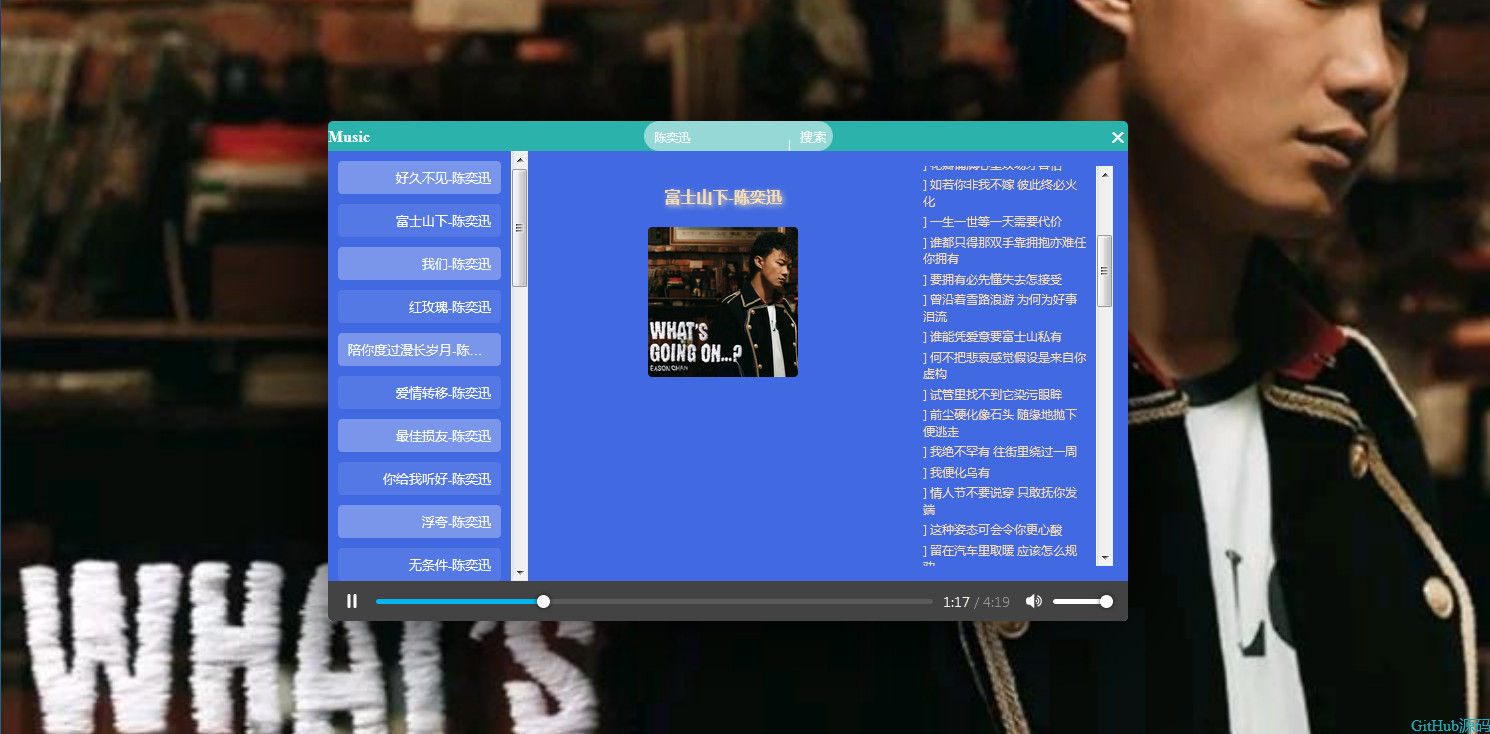
源码:
<!DOCTYPE html>
<html lang="zn">
    <head>
        <meta charset="UTF-8">
        <meta name="viewport" content="width=device-width, initial-scale=1.0">
        <title>Vue音乐实例 _ Ganto</title>
        <link rel="stylesheet" href="css/index.css">
        <link rel="shortcut icon" type="text/css" href="http://ganto.xyz/images/favicon.ico"/>
    </head>
    <body>
        <div id="box">
            <div id="app">
                <div class="header">
                    <span class="ntm"><a style="color: white;text-decoration: none;" href="#">Music</a></span>
                    <div class="search">
                        <input type="text" placeholder="请输入歌手名字" class="text" v-model="city" @keyup.enter="getjoke">
                        <input type="button" class="button" value="搜索" @click="getjoke" >
                    </div>
                    <span class="tm" title="点击隐藏"><i>右上角展开</i>×</span>
                </div>
                <ul>
                    <li class="li" :title="a.name + '-' + a.artists[0].name" v-for="(a,index) in arr" @click="fun(a.id,a.name,a.artists[0].name)">{{a.name}}-{{a.artists[0].name}}</li>
                </ul>
                <div class="section">
                    <div class="nar">
                        <span class="name">{{ name }}</span>
                        <img class="img" :src="imgUrl" alt="">
                    </div>
                    <div class="lyric">
                        <span v-for="lrc in lyric">{{ lrc.toString().substring(10,)  }}</br></span>
                    </div>
                </div>
                <audio autoplay controls loop :src="url"></audio>
            </div>
            <span class="kai" title="展开">√</span>
            <span class="github" title="右键关闭"><a style="color: #2ab;text-decoration: none;" href="http://ganto.xyz/vue/musicVueDemoByGanto.zip">GitHub源码</a></span>
        </div>
        <script src="https://cdn.bootcss.com/jquery/3.4.1/jquery.min.js"></script>
        <script src="https://unpkg.com/axios/dist/axios.min.js"></script>
        <!-- 开发环境版本,包含了有帮助的命令行警告 -->
        <script src="https://cdn.jsdelivr.net/npm/vue/dist/vue.js"></script>
        <script src="js/index.js"></script>
        <script>
            $(function(){
                $(".kai").hide();
                $(".tm i").hide();
                $(".tm").click(function(){
                    $("#app").slideUp(100);
                    $(".kai").fadeIn();
                });
                $(".tm").hover(function(){
                    $(".tm i").stop().slideDown();
                },function(){
                    $(".tm i").stop().slideUp();
                })
                $(".kai").click(function(){
                    $("#app").slideDown(100);
                    $(".kai").fadeOut();
                });
                var app = $("#app"),
                    header = $(".header");
                var disX,
                    disY;
                header.mousedown(function(e){
                    disX = e.pageX - parseInt(app.offset().left);
                    disY = e.pageY - parseInt(app.offset().top);
                    document.onmousemove = function(e){
                        var event = e || window.event;
                        app.css({"left":e.pageX - disX + "px", "top":e.pageY - disY + "px"});
                    }
                    document.onmouseup = function(){
                        document.onmousemove = null;
                    }

                })
                $(".github").mousedown(function(e){
                    if(e.button == 2){
                        $(this).fadeOut();
                    }
                })
            })
        </script>
    </body>
</html>
https://www.bilibili.com/video/av76249419?p=4
另外一个好的Vue教程:
Vue - 快速入门,这一套就够了!(Vue core + 案例 + 效果演示)-CSDN博客
三、
axios
axios.get('/user?ID=12345')
	.then(function (response) {
    console.log(response);
  })
  .catch(function (error) {
    console.log(error);
  });

axios.get('/user', {
    params: {
      ID: 12345
    }
  })
  .then(function (response) {
    console.log(response);
  })
  .catch(function (error) {
    console.log(error);
  });
参考:https://blog.csdn.net/wysxr/article/details/114592498
四、常用组件
1.https://element.eleme.cn/#/zh-CN/component/input
2.https://www.creative-tim.com/vuematerial/components/table(国外)
3.https://www.creative-tim.com/vuematerial/components/table
参考:
https://blog.csdn.net/qq_44757034/article/details/128090797
五、原来还可以这样写代码

https://www.youtube.com/watch?v=l-9S3GtVxr8&list=PL8p2I9GklV44m5tFH-zjCmTiHeq9GZrby&index=5