

一、数据库中添加目录
(一)修改model
之前的数据库设计中没有考虑商品分类,所以需要新增一个Category的数据库。这个操作本来很简单,就是修改model,然后migrate即可。
但是由于原来数据库中已经存在了数据,所以我做migrate的时候,又提示什么字段不能使用默认值0,报了很多出错的信息,后来我直接将\coupon\migrations下面刚刚生成的py文件都删除了,再来做migrate,不过一下又说某个字段已经建立,一下又说Category表格已经存在,最后又出现如下错误:
django.db.utils.IntegrityError: (1452, 'Cannot add or update a child row: a fore
ign key constraint fails (`jd2`.`#sql-19fc_273`, CONSTRAINT `coupon_goods_catego
ry_id_15d33dd64cbe0dd0_fk_coupon_category_id` FOREIGN KEY (`category_id`) REFERE
NCES `coupon_category` (`id`))')
先不管它,继续。
2018-Aug-05 补记:
第二天给数据表添加新字段,执行python manage.py migrate还是出错,提示category已经存在,不能重复建立,我将建立category的sql命令删除,又提示不能resolve category,后来没办法,我只好将原先建立的数据表删除,然后将migrations文件夹下面,除了__init__.py之外的所有文件全部删除(__pycache__文件夹不要删除,不过里面的相关文件也要删除),
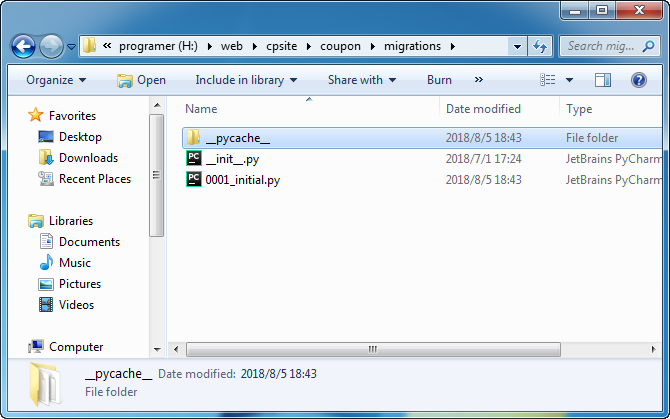
然后再重新执行makemigrations 和migrate命令。没想到还是出错:
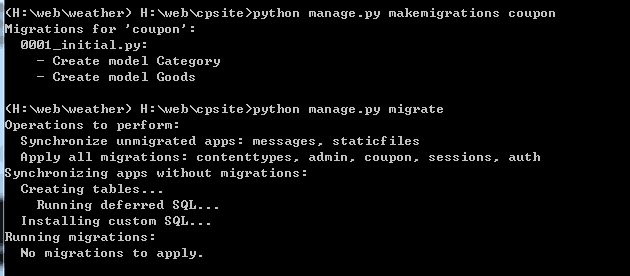
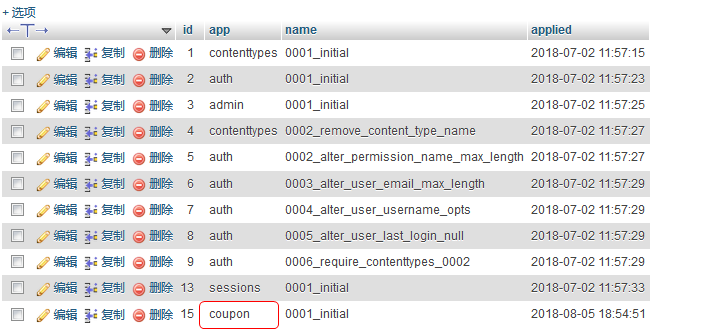
后来问了别人,才知道要在数据库中,将migration表的相关记录也删除才行。就是下面这张表,找到app中名称 为你的app名称的记录,删除就可以了。
(二) save 和create
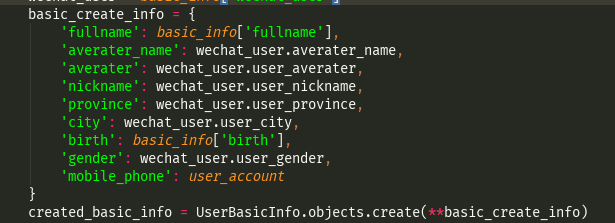
save的时候,建立用create
name = single['cidname']
cid = single['cid']
nameid = Category.objects.create(name=name,namecid=cid)
(三)foreign key的问题
后来我向商品数据表中的商品类别插入商品分类ID的时候,又出现了如下错误:
ValueError: Cannot assign "6144": "Goods.category" must be a "Category" instance.
在这里找到解决方案
you need to change your model structure, so you will be rather doing:
scripter = Scripter.objects.get(name="joshua")
book = Book.objects.Create(script_title="some title",scripter=scripter)
按上面的方法修改,又出现了如下的错误:
coupon.models.MultipleObjectsReturned: get() returned more than one Category --
it returned 4!
原来是目录名称重复了,因为我是根据目录的id查找的,返回了4条目录的记录。
(四)文章表中存储文章分类
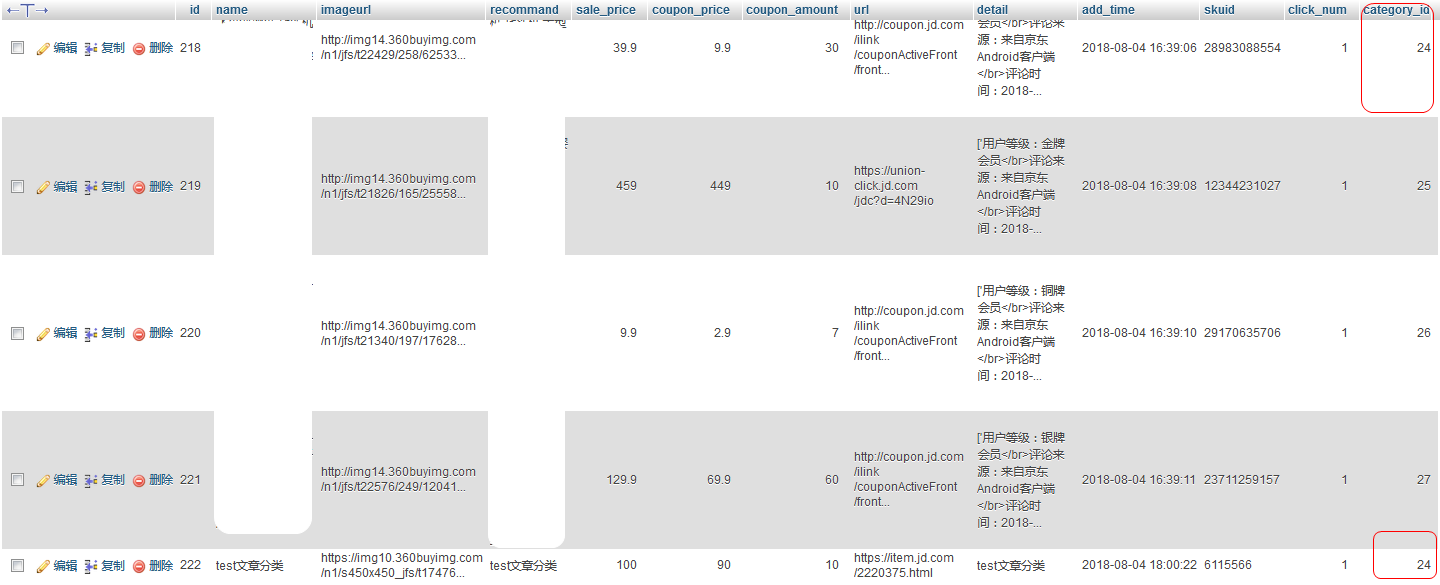
在文章数据表中,存储是商品分类的ID,我专门进后台发文章测试了一下。
二、修改首页逻辑
将views.py中首页的逻辑由函数改成class。
from django.views.generic import View

class IndexView(View):
    """
    首页
    """
    def get(self, request):
        coupon_list = Goods.objects.all()
        return render(request, 'coupon/index.html', {'coupon_list':coupon_list})
修改urls.py中的配置
url(r'^$', IndexView.as_view(), name='index'),
三、修改一个小按钮
仿的前端页面,有一个按钮,原来是红色的,到了我的网站就变成浅色了。
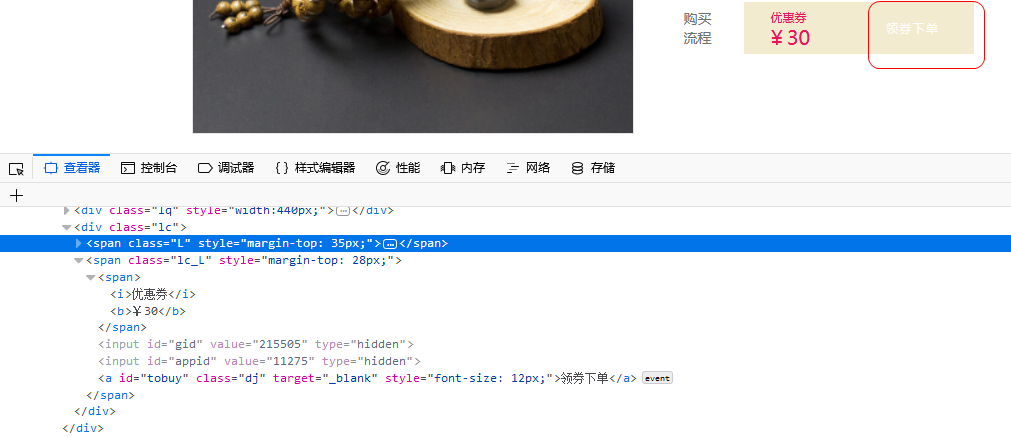
后来通过将style.css中的
background: url("pic/coupon-btn.png") no-repeat scroll 0 0;
直接改成:
background: #ED145B;
终于显示成红色了。或者直接改成red也行。
四、搜索功能
将category的代码改成以下这样:
def categorylist(request,c_id):
    # 搜索功能
    search_keywords = request.GET.get('keywords', '')
    if search_keywords:
        # icontains是包含的意思(不区分大小写)
        categorylist = all_products.filter(name__icontains=search_keywords)
    else:
        categorylist = all_products.filter(category_id=c_id)
    return render(request, 'coupon/category.html', {'categorylist': categorylist})
再在urls.py中,将原来的代码
url(r'^category/(?P<c_id>\d+)/$',views.categorylist),
改成:
url(r'^category/(.*)',views.categorylist),
然后在模板文件中,将搜索的链接改成
<a href="category/?keywords=秋装" target="_blank">
就可以了。这样不论是点击搜索,还是点击文章的目录,都可以正常跳转了。
五、顶部搜索框
原来想用JS来解决,可是用的别人的JS的代码,有各种问题,包括:
1、在首页可以搜索,在商品详情页、列表页无法搜索。
2、在chrome、IE浏览器下面可以正常搜索,在firefox浏览器下无法使用,点击搜索出现出错页面。
3、修改代码后,在IE浏览器下,跳转网址中出现已经注释过的代码中的跳转网址。
最后,不使用JS,AJAX,直接使用django内置功能完成搜索功能,目前只搜索商品标题。当然,以后有需要,可以使用django-haystack,它支持全文检索、按搜索相关度排序、关键字高亮等功能。
前端测试代码:
<!DOCTYPE html>
<html lang="en">
<head>
    <meta charset="UTF-8">
    <title>Title</title>
    <link rel="stylesheet" type="text/css" media="screen" href="https://cdn.bootcss.com/ionicons/2.0.1/css/ionicons.min.css">
</head>
<body>
<form role="search" method="get" id="searchform" action="{% url 'coupon:search' %}">
  <input type="search" name="q" placeholder="搜索" required>
  <button type="submit"><span class="ion-ios-search-strong"></span></button>
</form>
</body>
</html>
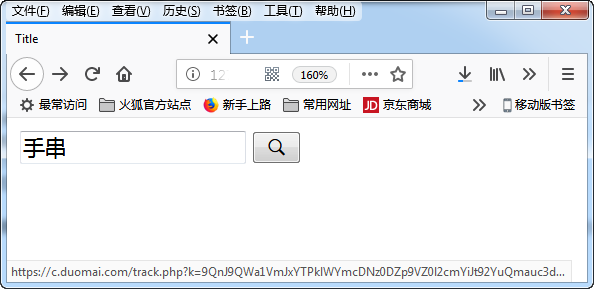
它是长成这样的:
views.py的代码:
def search(request):
    q = request.GET.get('q')
    error_msg = ''

    if not q:
        error_msg = '请输入关键词'
        return render(request, 'coupon/category.html', {'error_msg': error_msg})
    else:
        categorylist = all_products.filter(name__icontains=q)
    return render(request, 'coupon/category.html', {'error_msg': error_msg,
                                               'categorylist': categorylist})
urls.py的代码:
url(r'^search/$', views.search, name='search'),
经测试,在各个页面均测试正常。
六、json loads错误问题
今天执行获取百度相关词的时候,出错了如下的错误:
json.decoder.JSONDecodeError: Invalid \escape: line 1 column 900 (char 899)
经过排查,是某字段中含有“\”符号,导致json loads的时候出错。
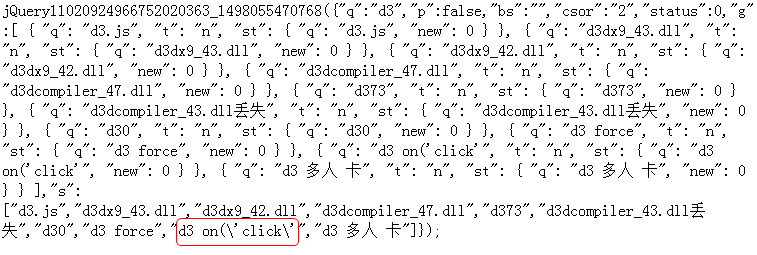
于是加了一段代码,直接将“\”给替换掉,暂时解决。
content = content.replace('\\', '')
七、分页功能
使用的是django pure pagination,差一点就没有调试成功了。
其实也很简单,先pip安装,然后在settings.py中添加INSTALLED_APPS,然后再修改views.py
def categorylist(request,c_id):
    #产品列表页
    list_categories = all_categories
    list_product = all_products
    try:
        page = request.GET.get('page', 1)
    except PageNotAnInteger:
        page = 1

    # Provide Paginator with the request object for complete querystring generation
    p = Paginator(list_product,16, request=request)   #这个list_product是全部的商品
    products = p.page(page)                #这个products是传到列表页的
    return render(request, 'coupon/category.html', {'products': products,
                                                     'list_categories':list_categories
                                                    })
最开始的时候,我的这行代码'products': products,写成了'list_product': products,结果前端显示不出来。
然后在前端的页面中,需要这样调用:
{% for categoryproduct in products.object_list %}
因为前面传过来的是products,所以这里直接抄这行代码就可以了。
然后就是修改下面的分页按钮,结果将代码copy到我的模板文件,浏览时报错:
Exception Value: Invalid block tag: 'trans', expected 'elif', 'else' or 'endif'
原来是要加上{% load i18n %}这段代码才行。
最后没搞出来,直接拿别人的来用了(只要views传过来是products,这里的代码什么都不用改):
<div class="pageturn">
            <ul class="pagelist">
            {% if products.has_previous %}
			<li class="long"><a href="?{{ products.previous_page_number.querystring }}" >上一页</a></li>
            {% endif %}
            {% for page in products.pages %}
            {% if page %}
            {% ifequal page products.number %}
            <li class="active"><a href="?{{ page.querystring }}">{{ page }}</a></li>
            {% else %}
			<li><a href="?{{ page.querystring }}">{{ page }}</a></li>
            {% endifequal %}
			{% else %}
            <li class="none"><a href="">...</a></li>
            {% endif %}
            {% endfor %}
            {% if products.has_next %}
            <li class="long"><a href="?{{ products.next_page_number.querystring }}">下一页</a></li>
            {% endif %}
            </ul>
         </div>
相应的css代码:
	  .pageturn {
		clear: both;
		height: 30px;
		margin: 50px auto;
		display: table;
		text-align: center;
	}

	.pageturn .pagelist {
		display: table-cell;
		vertical-align: middle;
		overflow: hidden;
	}

	.pageturn li {
		width: 30px;
		height: 30px;
		line-height: 30px;
		margin-left: 10px;
		float: left;
		text-align: center;
	}

	.pageturn li:first-child {
		margin-left: 0;
	}

	.pageturn li:hover a, .pageturn .active a {
		background: #f5114a;
		color: #fff;
		border-color: #eaeaea;
	}

	.pageturn a {
		border: 1px solid #eaeaea;
		display: block;
		height: 28px;
		color: #6c6c6c;
	}

	.pageturn .long {
		width: 100px;
	}

	.pageturn .none a {
		border: 0;
	}

	.pageright {
		float: right;
		width: auto;
		display: inline;
		clear: none;
		margin-top: 10px;
	}
2018-Aug-12:
今天终于将此网站全部开发完成,可以布署上线了。
八、优化搜索页面
搜索页面是套用的产品列表页,搜索结果中也会显示这样的东西:
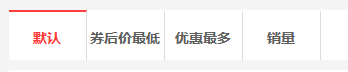
这里的链接又是根据某一目录排序的,这样对搜索结果其实是不适用的,因为根据某一产品关键字搜索出来的东西很可能属于不同的分类。所以通过以下代码将这部分内容在搜索结果页面隐藏:
       {% ifequal display 1 %}
        <a href="/category/{{c_id}}_1/">
            <li class="yes">券后价最低</li>
        </a>
        <a href="/category/{{c_id}}_2/">
            <li class="yes">优惠最多</li>
        </a>
        <a href="/category/{{c_id}}_3/">
            <li class="yes">销量</li>
        </a>
        {% endifequal %}
即在列表页传一个display=1的参数,这个参数等于1的时候,才会显示if代码块中包含的内容,这样就达到了在搜索结果页面隐藏这部分内容的目的。
九、优化产品列表页面
原来的www.xx.com/list/和www.xx.com/list/1/写了两个函数,而且配置了两条url。
    url(r'^category/(?P<c_id>\d+)/$',views.listdetail),
    url(r'^category/(.*)',views.categorylist),
views.py
def categorylist(request,c_id):
    #产品列表页
    list_categories = all_categories
    list_product = all_products
    sort = request.GET.get('sort', "")
    if sort:
        if sort == "price":
            list_product = all_products.order_by("coupon_price")
        elif sort == "99":
            list_product = all_products.filter(coupon_price__lte=20)
        elif sort == "sales":
            list_product = sale_product
        else:
            sort == "coupon"
            list_product = all_products.order_by("-coupon_amount")
     #分页
    try:
        page = request.GET.get('page', 1)
    except PageNotAnInteger:
        page = 1

    # Provide Paginator with the request object for complete querystring generation
    p = Paginator(list_product,16, request=request)
    products = p.page(page)
    return render(request, 'coupon/category.html', {'products': products,
                                                     'list_categories':list_categories
                                                    })


def listdetail(request,c_id):
    #带分类ID的列表页
    list_categories = all_categories[:14]
    #通过分类ID取得该分类下的所有产品
    list_product = all_products.filter(category_id=int(c_id)).order_by('-add_time')
    sort = request.GET.get('sort', "")
    if sort:
        if sort == "price":
            list_product = list_product.order_by("coupon_price")
        elif sort == "sales":
            list_product = list_product.order_by("sale_amount")
        else:
            sort == "coupon"
            list_product = list_product.order_by("-coupon_amount")
    #分页
    try:
        page = request.GET.get('page', 1)
    except PageNotAnInteger:
        page = 1
    p = Paginator(list_product, 16, request=request)
    products = p.page(page)
    return render(request, 'coupon/category.html', {'products': products,
                                                    'list_categories':list_categories
                                                    })
今天将它优化了一下,合并成了一个函数。
def categorylist(request,c_id,sort):
    """
    产品列表页
    """
    list_categories = all_categories
    display = 1
    #设定一个变量,控制相关html的显示
    if c_id == "0":
    #直接list列表,不带分类ID
        if sort == "0":
        #默认按时间排序
            list_product = all_products
        elif sort == "1":
        #按券后价最低排序
            list_product = all_products.order_by("coupon_price")
        elif sort == "2":
        #按优惠最多排序
            list_product = all_products.order_by("-coupon_amount")
        elif sort == "3":
        #按销量排序排序
            list_product = all_products.order_by("-sale_amount")
        else:
            return render(request, 'coupon/404.html')
    else:
    #带分类ID的列表页
        list_categories = all_categories[:14]
        list_product = all_products.filter(category_id=int(c_id)).order_by('-add_time')
        if sort == "0":
            pass
        elif sort == "1":
            list_product = list_product.order_by("coupon_price")
        elif sort == "2":
            list_product = list_product.order_by("-coupon_amount")
        elif sort == "3":
            list_product = list_product.order_by("-sale_amount")
        else:
            return render(request, 'coupon/404.html')
    # 分页
    try:
        page = request.GET.get('page', 1)
    except PageNotAnInteger:
        page = 1
    p = Paginator(list_product, 16, request=request)
    products = p.page(page)
    return render(request, 'coupon/category.html', {'products': products,
                                                    'list_categories': list_categories,
                                                    'c_id':c_id,
                                                    'display':display
                                                    })