
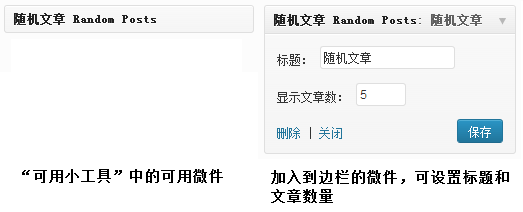
我们想要在Wordpress的侧边栏添加一个随机文章的栏目,而且想要通过WordPress后台小工具添加,只需要将以下代码加到模板文件的functions.php 文件中,在WordPress 后台中的“小工具”里就会增加一个“随机文章”的可用小工具,将其添加到边栏中作为微件显示出来。
//随机文章小工具
class RandomPostWidget extends WP_Widget
{
    function RandomPostWidget()
    {
        parent::WP_Widget('bd_random_post_widget', '随机文章', array('description' =>  '我的随机文章小工具') );
    }

    function widget($args, $instance)
    {
        extract( $args );

        $title = apply_filters('widget_title',empty($instance['title']) ? '随机文章' :
$instance['title'], $instance, $this->id_base);
        if ( empty( $instance['number'] ) || ! $number = absint( $instance['number'] ) )
        {
            $number = 10;
        }

        $r = new WP_Query(array('posts_per_page' => $number, 'no_found_rows' => true,
'post_status' => 'publish', 'ignore_sticky_posts' => true, 'orderby' =>'rand'));
        if ($r->have_posts())
        {
            echo "\n";
            echo $before_widget;
            if ( $title ) echo $before_title . $title . $after_title;
            ?>
<ul class="line">
<?php  while ($r->have_posts()) : $r->the_post(); ?>
<li><a href="<?php the_permalink() ?>" title="<?php echo esc_attr(get_the_title() ? get_the_title() : get_the_ID()); ?>"><?php if ( get_the_title() ) the_title(); else the_ID(); ?></a></li>
<?php endwhile; ?>
</ul><?php
            echo $after_widget;
            wp_reset_postdata();
        }
    }

    function update($new_instance, $old_instance)
    {
        $instance = $old_instance;
        $instance['title'] = strip_tags($new_instance['title']);
        $instance['number'] = (int) $new_instance['number'];
        return $instance;
    }

    function form($instance)
    {
        $title = isset($instance['title']) ? esc_attr($instance['title']) : '';
        $number = isset($instance['number']) ? absint($instance['number']) : 10;?>
        <p><label for="<?php echo $this->get_field_id('title'); ?>"><?php _e('Title:'); ?></label>
        <input id="<?php echo $this->get_field_id('title'); ?>" name="<?php echo $this->get_field_name('title'); ?>" type="text" value="<?php echo $title; ?>" /></p>

        <p><label for="<?php echo $this->get_field_id('number'); ?>"><?php _e('Number of posts to
show:'); ?></label>
        <input id="<?php echo $this->get_field_id('number'); ?>" name="<?php echo $this->get_field_name('number'); ?>" type="text" value="<?php echo $number; ?>" size="3" /></p>
<?php
    }

}
add_action('widgets_init', create_function('', 'return register_widget("RandomPostWidget");'));