一、成果展示
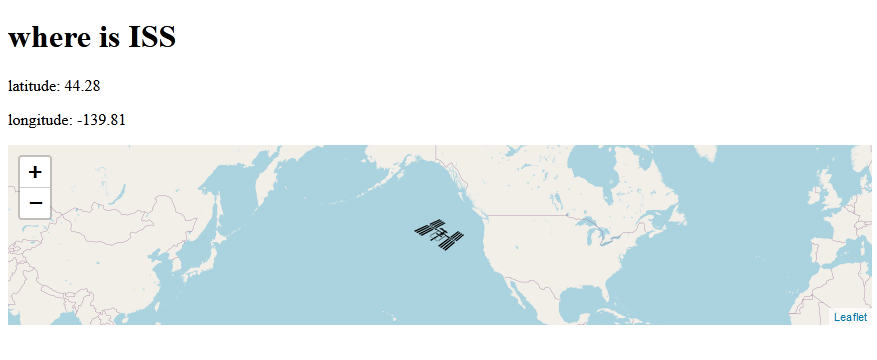
二、主要知识点
(一)leaflet
https://leafletjs.com/
Leaflet 是一个为移动设备设计的交互式地图的开源的 javascript库, 并只有38k,包含了大多数开发者需要的地图特点。它的特点如下:
1 leaflet是对手机端地图展示友好的开源的轻量级javascript库。
2 leaflet的跨终端支持良好,扩展性强
3 简单易上手,代码开源。
(二)setInterval
setInterval是一个实现定时调用的函数,可按照指定的周期(以毫秒计)来调用函数或计算表达式。setInterval方法会不停地调用函数,直到 clearInterval被调用或窗口被关闭。
三、代码
index.html
<!DOCTYPE html>
<html lang="en">
<head>
<meta charset="UTF-8">
<meta name="viewport" content="width=device-width, initial-scale=1.0">
<link rel="stylesheet" href="https://unpkg.com/leaflet@1.7.1/dist/leaflet.css"
integrity="sha512-xodZBNTC5n17Xt2atTPuE1HxjVMSvLVW9ocqUKLsCC5CXdbqCmblAshOMAS6/keqq/sMZMZ19scR4PsZChSR7A=="
crossorigin=""/>
<script src="https://unpkg.com/leaflet@1.7.1/dist/leaflet.js"
integrity="sha512-XQoYMqMTK8LvdxXYG3nZ448hOEQiglfqkJs1NOQV44cWnUrBc8PkAOcXy20w0vlaXaVUearIOBhiXZ5V3ynxwA=="
crossorigin=""></script>
<title>Document</title>
<style>
#issMap { height: 180px; }
</style>
</head>
<body>
<h1>where is ISS</h1>
<p>latitude: <span id="lat"></span></p>
<p>longitude: <span id="lon"></span></p>
<div id="issMap"></div>
<script>
// making a map and tiles
const map = L.map('issMap').setView([0, 0], 1);
const arribution = 'Map data © <a href="https://www.openstreetmap.org/copyright">OpenStreetMap</a> contributors, Imagery © <a href="https://www.mapbox.com/">Mapbox</a>';
const tileUrl = "https://{s}.tile.openstreetmap.org/{z}/{x}/{y}.png";
const tiles = L.tileLayer(tileUrl, { arribution });
tiles.addTo(map);
//making a marker with a custom icon
var myIcon = L.icon({
iconUrl: 'iss.png',
iconSize: [50, 32],
iconAnchor: [25, 16],
// popupAnchor: [-3, -76],
// shadowUrl: 'my-icon-shadow.png',
// shadowSize: [68, 95],
// shadowAnchor: [22, 94]
});
const marker = L.marker([0,0], { icon:myIcon}).addTo(map);
const api_url = "https://api.wheretheiss.at/v1/satellites/25544";
let firstTime = true;
async function getISS(){
const response = await fetch(api_url);
const data = await response.json();
console.log(data)
const {latitude,longitude} = data;
// L.marker([latitude, longitude]).addTo(map);
marker.setLatLng([latitude, longitude]);
if (firstTime){
map.setView([latitude, longitude],2);
firstTime = false;
}
console.log("latitude")
document.getElementById("lat").textContent =latitude.toFixed(2);
document.getElementById("lon").textContent =longitude.toFixed(2);
console.log(data)
}
getISS()
// setInterval(getISS, 2000);
</script>
</body>
</html>
参考:https://www.youtube.com/watch?v=jKQUHGpOHqg&list=PLRqwX-V7Uu6YxDKpFzf_2D84p0cyk4T7X&index=9