Coolie的功能:
1:功能:保存一小块数据
2:常用Cookies属性:expires,path,domain,secure
3:写入Cookies:格式 name=value
4:用escape编码,unescape解码
5:用obj.setTime(obj.getTime+60*1000)设置过期时间
6:cookie保存的数据不能超过4096bytes(即4K)
7:cookie读取的时候用indexOf,substring,或者split
首先看一下代码:
<script language="javascript" type="text/javascript">
function checkInCorrect()      //判断用户名和密码是否为空
{
     if (document.getElementById('txtUserName').value=="")
   {
    alert('请输入用户名!')
    document.getElementById('txtUserName').focus(); //这个是HTML DOM对象的方法,并不是js的函数,该方法表示将输入焦点移至对象上.
    return false
   }
   if (document.getElementById('txtPassword').value=="")
   {
    alert('请输入密码!')
    document.getElementById('txtPassword').focus();
    return false
   }
   else
   {
    saveInfo();
    return true;
   }
}


saveInfo = function(){
try{
   var isSave = document.getElementById('chkRememberPwd').checked;   //保存按键是否选中
   if (isSave) {
    var usernm = document.getElementById('txtUserName').value;
    var userpsw = document.getElementById('txtPassword').value;
    if(usernm!="" && userpsw!=""){
     SetCookie(usernm,userpsw);
    }
   }else {
    SetCookie("","");
   }
}catch(e){

}
}

function SetCookie(usern,psw){
var Then = new Date()  ////获取当前时间
Then.setTime(Then.getTime() + 1866240000000)
document.cookie ="username=" + usern + "%%"+psw+";expires="+ Then.toGMTString() ;
}


function GetCookie(){
var nmpsd;
var nm;
var psd;
var cookieString = new String(document.cookie)
var cookieHeader = "username="
var beginPosition = cookieString.indexOf(cookieHeader)
cookieString = cookieString.substring(beginPosition);
var ends=cookieString.indexOf(";");
if (ends!=-1){
   cookieString = cookieString.substring(0,ends);
}
if (beginPosition>-1){
   nmpsd = cookieString.substring(cookieHeader.length);
   if (nmpsd!=""){
    beginPosition = nmpsd.indexOf("%%");
    nm=nmpsd.substring(0,beginPosition);
    psd=nmpsd.substring(beginPosition+2);
    document.getElementById('txtUserName').value=nm;
    document.getElementById('txtPassword').value=psd;
    if(nm!="" && psd!=""){
     document.forms[0].checkbox.checked = true
    }
   }
}
}
</script>
</head>
<body onLoad="document.getElementById('txtUserName').focus();GetCookie();">
<form>
    用户名:<input type="text" ID="txtUserName" onblur="GetPwdAndChk()">
    密  码:<input type="password" ID="txtPassword">
    <input type="checkbox" ID="chkRememberPwd" />记住密码
    <input type="button" OnClick="checkInCorrect()" value="进入"/>
</form>
</body>
运行起来是这样的:

在Firefox浏览器通过:工具--页面信息,就可以查看cookie了。
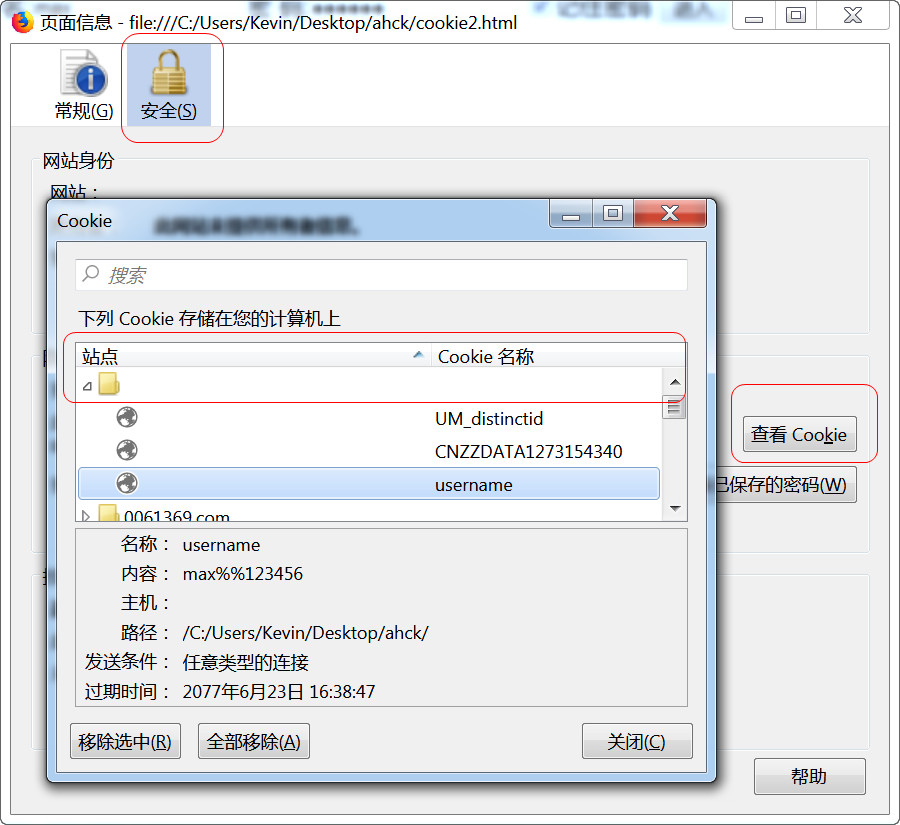
因为本地不存在域名,所以域名为空。
另外一个代码:
<HTML>
<SCRIPT LANGUAGE="JavaScript">
function Set(){
    var Then = new Date()
    Then.setTime(Then.getTime() + 60*1000 )   //60秒
    document.cookie = "Cookie1=测试数据;expires="+ Then.toGMTString()
}

另一种按天的写法,有效期7天
//var date = new Date()
//date.setDate((date.getDate()+7));
//document.coolie = 'urser='+ encodeURIComponent('李炎灰') + ';expires=' + date;

function Get(){
    var cookieString = new String(document.cookie)  //就是取得cookie的内容
    var cookieHeader = "Cookie1="
    var beginPosition = cookieString.indexOf(cookieHeader)  //cookie读取的时候用indexOf,substring,或者split
    if (beginPosition != -1){
        document.all.Textbox.value = cookieString.substring(beginPosition
            + cookieHeader.length)
        }
    else
        document.all.Textbox.value = "Cookie 未找到!"
}
</SCRIPT>
<BODY>
设置与读取 cookies...<BR>
<INPUT TYPE = BUTTON Value = "设置cookie" onClick = "Set()">
<INPUT TYPE = BUTTON Value = "读取cookie" onClick = "Get()"><BR>
<INPUT TYPE = TEXT NAME = Textbox>
</BODY>
</HTML>
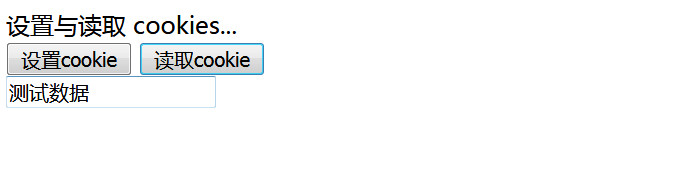
运行结果如下:
第三个代码:
//创建cookie的通用函数。
function setCookie(name, value, expires, path, domain, secure){
	var cookieName = encodeURIComponent(name) + '='+encodeURIComponent(value);
	if(expires instanceof Date){
		cookieName += ';expires='+expires;
	}
	if(path){
		cookieName += ';path='+path;
	}
	if(domain){
		cookieName += ';domain='+domain;
	}
	if(secure){
		cookieName += ';secure';
	}
	document.cookie = cookieName;
}

//封闭一个过期时间  return结果:Fri May 11 2018 20:04:06 GMT+0800 (China Standard Time)
function setCookieDate(day){
	var date = null;
	if(typeof day == 'number' && day >0){
		date = new Date();
		date.setDate(date.getDate() + day);
	}else{
		throw new Error('天数不合法');
	}
	return date
}


setCookie('user','李炎恢',setCookieDate(7));
setCookie('url','www.yc60.com',setCookieDate(7));
setCookie('email','yc@163.com',setCookieDate(7));
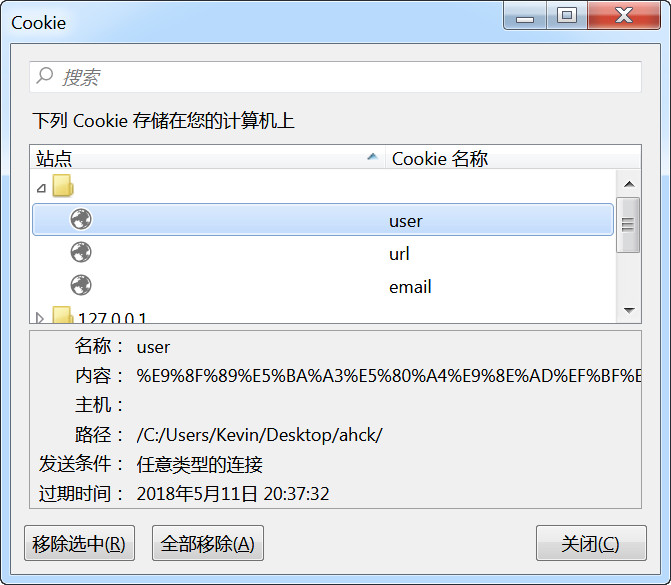
上面的代码运行后,会生成三个cookie
获取cookie
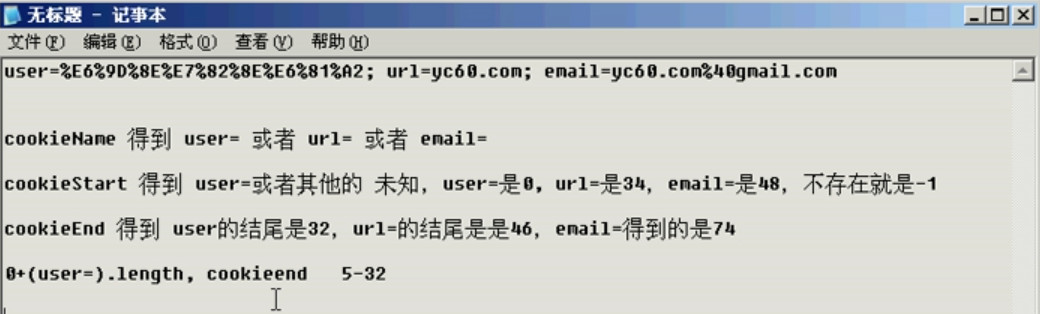
//获取cookie  传递一个user,获取后面的值,传递一个url,获取后面的值
function getCookie(name){
	var cookieName = encodeURIComponent(name) + '=';
	var cookieStart = document.cookie.indexOf(cookieName);
	var cookieValue = null;

	if(cookieStart > -1){
		var cookieEnd = document.cookie.indexOf(';',cookieStart);
		if (cookieEnd == -1) {
			cookieEnd = document.cookie.length;
		}
		cookieValue = decodeURIComponent(document.cookie.substring(cookieStart + cookieName.length,cookieEnd));
	}
	return cookieValue;
}
再看一个自己要用的:
var cookieString = new String(document.cookie);  //就是取得cookie的内容
var cookieHeader = "yxxxyxxx";
var beginPosition = cookieString.indexOf(cookieHeader);
var bjs;
if (beginPosition != -1){
	bxx="y";
document.writeln("<SCRIPT type=text/javascript src=\"/ad/a.js\"></SCRIPT>");
}